Domain Monitoring
The Domain Monitoring page tracks suspicious domains for availability, content changes, and newly registered threats targeting the crypto ecosystem. Domains flow in from multiple discovery sources and are polled on a configurable schedule. When a domain that was previously offline comes online, the system triggers an automated investigation.
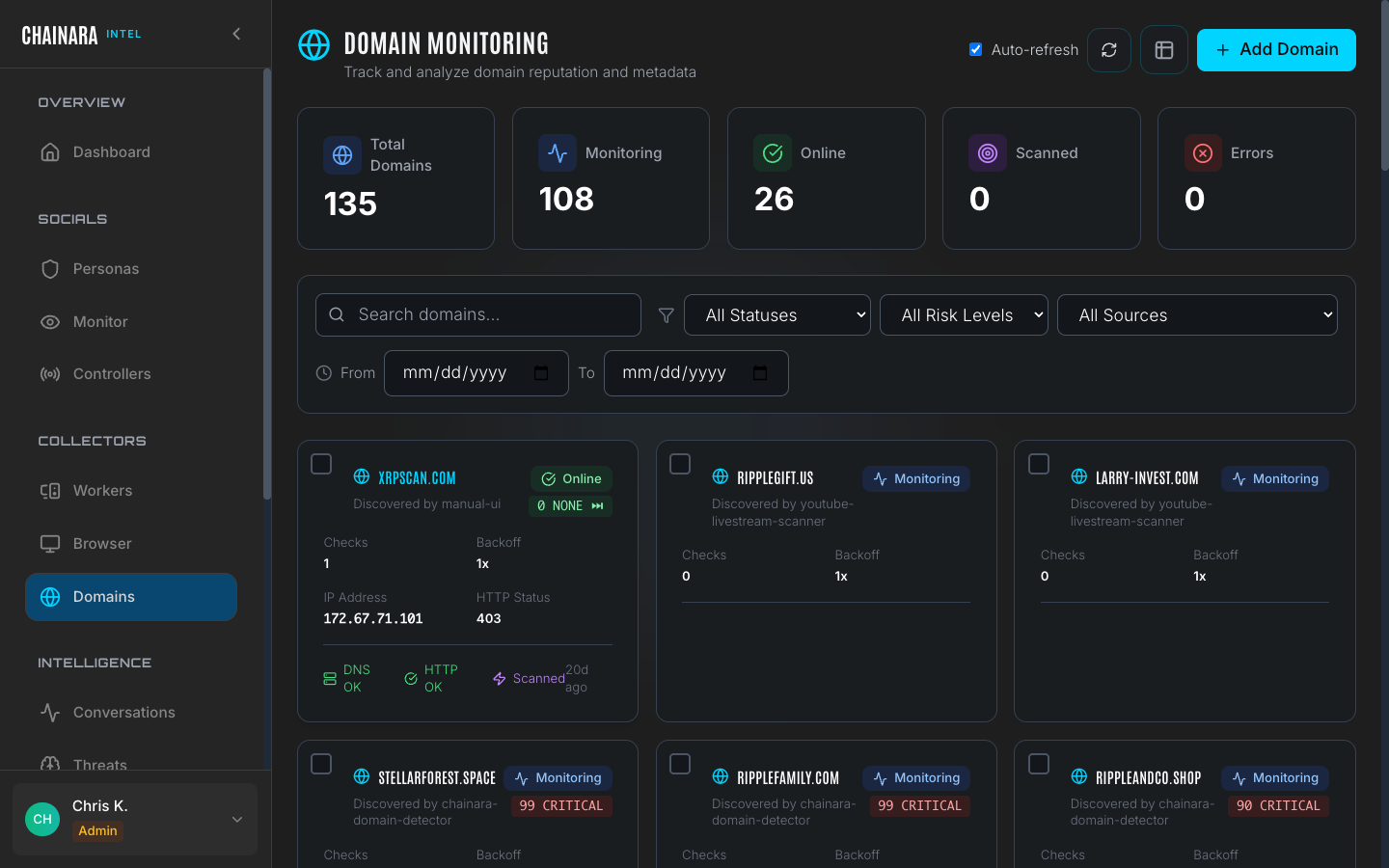
Overview stats
The stats bar at the top shows live counts across all monitored domains:
| Metric | Description |
|---|---|
| Total domains | All domains known to the system |
| Monitoring | Domains with active periodic checks enabled |
| Online | Currently live and HTTP-reachable |
| Scanned | Domains pending their first worker scan |
| Errors | Domains that failed their last availability check |
Discovery sources
Domains enter the monitoring list from several sources automatically, as well as via manual addition:
| Source | Description |
|---|---|
| manual-ui | Manually added by an analyst using the Add Domain form |
| chainara-domain-detector | Auto-discovered by the domain detection rule engine, which monitors registration feeds and typosquat patterns |
| youtube-livestream-scanner | Detected in live YouTube crypto scam streams: the scanner reads URLs displayed on screen during fraud livestreams |
| conversation extraction | URLs shared by scammers in persona conversations: extracted in real time as IOCs |
| pivot-discovery | Auto-discovered related infrastructure: when a scan confirms a critical scam, Chainara finds other domains run by the same actor and monitors them too (see below) |
Auto-discovered infrastructure
When a scan confirms a domain is a critical scam, Chainara automatically looks for other domains operated by the same threat actor and adds them to your monitoring list, so a single confirmed detection expands into the actor's wider campaign with no manual work. Auto-discovered domains carry the pivot-discovery source, so you can always tell them apart from domains you submitted yourself.
Guardrails keep this focused rather than noisy:
- It triggers only on confirmed critical scams: not on low/medium or unverified hits.
- It ignores shared infrastructure (CDNs, common website templates, hosting error and bot-challenge pages), so it won't fill your list with unrelated sites.
Auto-discovery is on by default. If you'd prefer Intel to monitor only the domains you explicitly submit: for cost, scope, or noise reasons: it can be turned off for your account. Contact your Chainara administrator.
Domain cards
Each monitored domain is displayed as a card on the main page. The card gives you an at-a-glance status view without needing to open a detail panel:
| Field | Description |
|---|---|
| Domain | The domain name |
| Status | Online / Monitoring / Offline / Error |
| Risk score | 0–99 with label: CRITICAL / HIGH / MEDIUM / LOW |
| Source | How the domain was discovered (see discovery sources above) |
| Checks | Total number of monitoring polls completed |
| Backoff | Current polling multiplier: 1x is normal frequency; higher values mean the system is reducing check frequency for dormant domains |
| IP address | Most recently resolved IP address |
| HTTP status | Last HTTP response code returned by the domain |
| DNS / HTTP OK | Whether DNS resolution and HTTP reachability both succeeded on the last check |
| Last checked | How long ago the most recent check ran |
Adding a domain
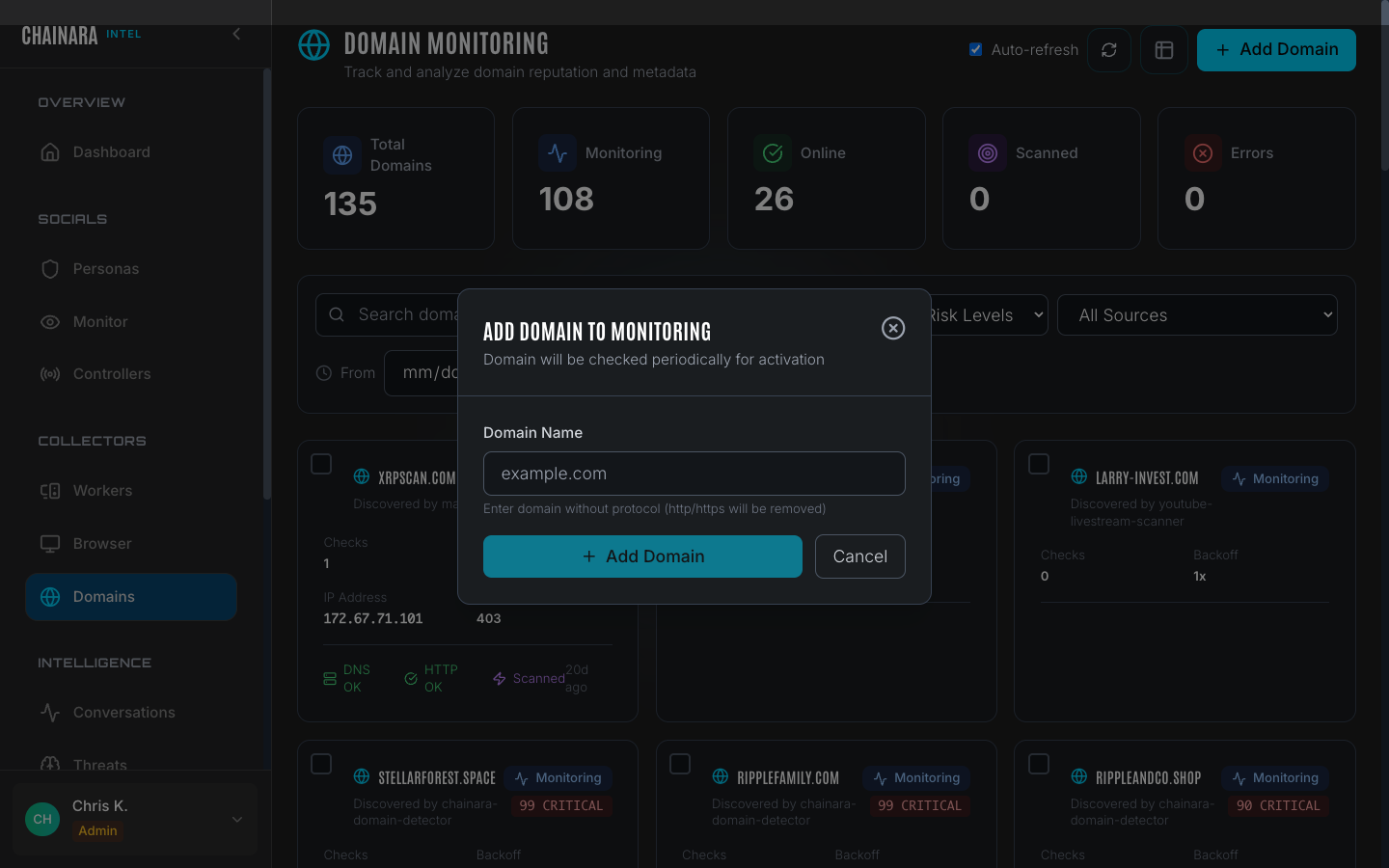
To manually add a domain to monitoring:
- Click Add Domain in the top right
- Enter the full domain name (e.g.
suspicious-exchange.xyz) - Set the initial risk classification: use this to pre-flag the domain before the first scan runs
- Choose the monitoring frequency: how often the system should poll for availability changes
- Optionally add notes describing how you found this domain and why it is suspicious
- Click Save
The domain is added to the monitoring list immediately and queued for its first availability check. If a worker scan is configured, it will be dispatched after the first successful DNS resolution.
When a domain goes online
When a monitored domain that was previously offline or unresolvable comes online, the system:
- Updates the domain status to Online
- Dispatches a worker scan to the configured Global Collector for forensic investigation
- Generates a monitoring alert visible on the dashboard
- Optionally triggers a webhook notification to your configured integration
This means you can add newly registered lookalike domains to monitoring immediately, even before they are live, and Intel will automatically investigate them the moment they resolve.
Add domains as soon as you identify them: even if they are offline. Many scam operations register domains days before launching their campaign. The backoff mechanism keeps polling costs low for dormant domains while ensuring you get immediate notification when one goes live.