API & Integration
Chainara Platform exposes a full REST API for integrating fraud intelligence into your own tools, SIEMs, and automated workflows.
API Keys
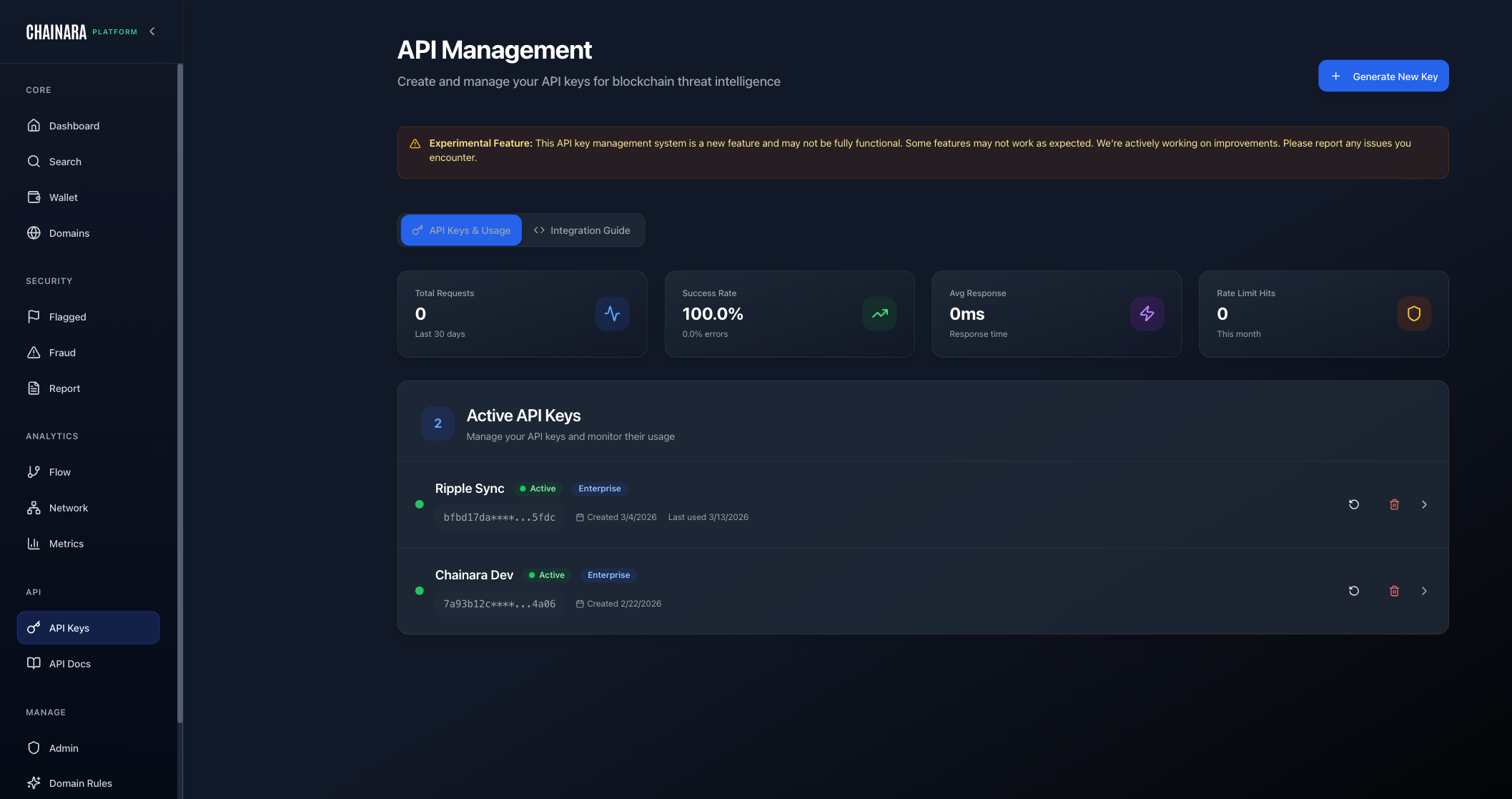
Generating a Key
Navigate to API Keys in the sidebar:
- Click Generate New Key
- Give it a descriptive name (e.g. "SIEM Integration", "Exchange Screening")
- Copy the key immediately: it is only shown once
- Store it securely (environment variable, secrets manager)
Managing Existing Keys
The API Keys page lists all active keys with their name, partial preview, creation date, last-used timestamp, and request stats. Click Delete to revoke a key.
Revocation is immediate. Any system using a deleted key will receive 401 Unauthorized on its next request.
Usage Stats
Each API key tracks its own usage metrics visible on the API Keys page:
| Metric | Description |
|---|---|
| Total Requests | All requests made with this key in the last 30 days |
| Success Rate | Percentage of requests that returned 2xx |
| Avg Response | Average response time in milliseconds |
| Rate Limit Hits | Number of 429 responses this month |
Use these to monitor integration health and identify keys that are hitting rate limits or seeing high error rates.
Base URLs
The API is served from your tenant-specific domain:
https://{tenant}-platform.chainara.io/api/v2
| Tenant | Base URL |
|---|---|
| Chainara (default) | https://platform.chainara.io/api/v2 |
| Ripple | https://ripple-platform.chainara.io/api/v2 |
| Your org | https://{tenant}-platform.chainara.io/api/v2 |
All /api/* requests are handled by the same-origin proxy on your tenant's Cloudflare Pages deployment and routed to the correct backend.
Authentication
All requests require the X-API-Key header:
X-API-Key: ek_YOUR_API_KEY
API keys are prefixed with ek_. There is no Bearer token scheme: use X-API-Key only.
Rate Limits
| Limiter | Window | Limit |
|---|---|---|
| Enterprise (per-minute) | 1 min | 500 requests |
| Enterprise (2-hour burst) | 2 hrs | 10,000 requests |
| Public endpoints | 15 min | 1,000 requests |
| Bulk operations | 1 hr | 100 requests |
| Auth endpoints | 15 min | 10 requests |
Monthly limit: 100,000 requests per API key (set at key creation time).
When rate limited, the API returns 429 Too Many Requests with a Retry-After header indicating how many seconds to wait before retrying.
Blockchain IDs
Use these in any endpoint that takes a blockchainId path parameter:
| ID | Chain | Symbol | Network Type | Status |
|---|---|---|---|---|
1 | XRPL | XRP | xrpl | Available |
2 | Stellar | XLM | stellar | Available |
3 | RLUSD | RLUSD | xrpl | Available |
4 | Flare | FLR | evm | Available |
5 | Bitcoin | BTC | bitcoin | Available |
6 | Ethereum | ETH | evm | Available |
7 | BSC | BNB | evm | Experimental |
8 | Polygon | MATIC | evm | Experimental |
9 | Arbitrum | ARB | evm | Experimental |
10 | Avalanche | AVAX | evm | Experimental |
11 | SUI | SUI | sui | Experimental |
Endpoint Reference
Wallets
| Method | Path | Description |
|---|---|---|
GET | /wallets/{blockchainId}/{address} | Full wallet intelligence |
GET | /wallets/{blockchainId}/{address}/risk-score | Risk score only |
GET | /wallet/{blockchainId}/{address}/sankey | Fund flow (Sankey) data |
Fraud Reports
| Method | Path | Description |
|---|---|---|
GET | /fraud-reports | List fraud reports (filterable) |
POST | /fraud-reports | Submit a fraud report |
Blacklist
| Method | Path | Description |
|---|---|---|
GET | /blacklist | List all blacklisted addresses |
Threat Feed (Enterprise)
| Method | Path | Description |
|---|---|---|
GET | /feed/snapshot | Full threat intelligence snapshot |
Webhooks (Enterprise)
| Method | Path | Description |
|---|---|---|
GET | /webhooks | List subscriptions |
POST | /webhooks | Create subscription |
PATCH | /webhooks/{id} | Update subscription |
DELETE | /webhooks/{id} | Delete subscription |
POST | /webhooks/{id}/test | Send a test delivery |
GET | /webhooks/{id}/deliveries | View delivery log |
POST | /webhooks/{id}/rotate-secret | Rotate signing secret |
Domains (Enterprise)
| Method | Path | Description |
|---|---|---|
POST | /domains/report | Submit a malicious domain to the threat database and queue for Intel scanning |
POST | /domains/monitor | Queue a domain for Intel scanning without writing to the threat database |
GET | /domains/lookup | Look up a domain's current threat record |
Ingest (Bulk Import)
| Method | Path | Description |
|---|---|---|
POST | /ingest/reports | Bulk import fraud reports |
POST | /ingest/wallets | Bulk import suspicious wallets |
POST | /ingest/domains | Bulk import malicious domains |
POST | /ingest/batch | Async batch ingest (large payloads) |
GET | /ingest/batch/{jobId} | Check async batch job status |
Intelligence
| Method | Path | Description |
|---|---|---|
GET | /intelligence/wallet-analysis | Advanced wallet intelligence and pattern analysis |
API Keys
| Method | Path | Description |
|---|---|---|
GET | /api-keys | List your API keys |
POST | /api-keys | Create a new API key |
Health
| Method | Path | Description |
|---|---|---|
GET | /health | API health check |
GET | /openapi.json | OpenAPI JSON spec (auth required) |
GET | /openapi.yaml | OpenAPI YAML spec (auth required) |
The full interactive Swagger UI is available in the Platform at API Docs in the sidebar, where you can explore and test every endpoint with your API key.
Code Examples
cURL
# Wallet intelligence lookup (XRPL, blockchain_id=1)
curl -H "X-API-Key: ek_YOUR_API_KEY" \
  "https://{tenant}-platform.chainara.io/api/v2/wallets/1/rYOUR_WALLET_ADDRESS"

# Risk score only
curl -H "X-API-Key: ek_YOUR_API_KEY" \
  "https://{tenant}-platform.chainara.io/api/v2/wallets/1/rYOUR_WALLET_ADDRESS/risk-score"
JavaScript
const BASE_URL = 'https://{tenant}-platform.chainara.io/api/v2';
const API_KEY  = 'ek_YOUR_API_KEY';

const headers = { 'X-API-Key': API_KEY };

// Wallet lookup
const res  = await fetch(`${BASE_URL}/wallets/1/rYOUR_WALLET_ADDRESS`, { headers });
const data = await res.json();

console.log(data.risk_score);        // 0–100
console.log(data.risk_level);        // "low" | "medium" | "high" | "critical"
console.log(data.is_blacklisted);    // boolean
console.log(data.classification);    // e.g. "Fake Giveaway"
Python
import requests

BASE_URL = 'https://{tenant}-platform.chainara.io/api/v2'
headers  = {'X-API-Key': 'ek_YOUR_API_KEY'}

# Single wallet lookup
r = requests.get(f'{BASE_URL}/wallets/1/rYOUR_WALLET_ADDRESS', headers=headers)
wallet = r.json()
print(wallet['risk_score'], wallet['risk_level'])
Wallet Response Schema
A GET /wallets/{blockchainId}/{address} response returns:
{
  "address": "rYOUR_WALLET_ADDRESS",
  "blockchain_id": 1,
  "risk_score": 85,
  "risk_level": "high",
  "confidence": 0.80,
  "is_blacklisted": true,
  "classification": "Fake Giveaway",
  "severity_tier": "blacklisted",
  "first_seen": "2024-01-15T10:30:00Z",
  "last_active": "2024-03-10T14:22:00Z",
  "balance_xrp": 0.0,
  "total_sent": 45000.0,
  "total_received": 45020.0,
  "signals": [
    {
      "type": "reported_fraud",
      "description": "3 fraud reports reference this address",
      "weight": 0.35
    },
    {
      "type": "linked_to_phishing_domain",
      "description": "Associated domain flagged as phishing",
      "weight": 0.25
    },
    {
      "type": "rapid_tx",
      "description": "Unusually high transaction frequency",
      "weight": 0.15
    }
  ],
  "fraud_reports": [],
  "associated_domains": []
}
Submitting Fraud Reports
curl -X POST "https://{tenant}-platform.chainara.io/api/v2/fraud-reports" \
  -H "X-API-Key: ek_YOUR_API_KEY" \
  -H "Content-Type: application/json" \
  -d '{
    "blockchain_id": 1,
    "wallet_address": "rYOUR_WALLET_ADDRESS",
    "scam_type": "fake_giveaway",
    "description": "Wallet promoted a double-your-XRP giveaway on Twitter",
    "domain": "xrp-giveaway-example.live",
    "evidence_urls": ["https://twitter.com/example/status/123"]
  }'
Scam type values: fake_giveaway, phishing, investment_scam, rug_pull, money_laundering, ponzi, exchange_hack, mixer
Submitted reports enter the system with verificationStatus: pending. They are visible in the Fraud Intelligence feed and queued for analyst review. Once verified, the wallet's risk score is recalculated.
Ingest API (Bulk Import)
The Ingest endpoints allow bulk submission of your own threat intelligence using your existing API key.
# Bulk import suspicious wallets
curl -X POST "https://{tenant}-platform.chainara.io/api/v2/ingest/wallets" \
  -H "X-API-Key: ek_YOUR_API_KEY" \
  -H "Content-Type: application/json" \
  -d '{
    "wallets": [
      {
        "blockchain_id": 1,
        "address": "rADDR1...",
        "reason": "Reported by victim: giveaway scam",
        "confidence": 0.85
      }
    ]
  }'

# Bulk import malicious domains
curl -X POST "https://{tenant}-platform.chainara.io/api/v2/ingest/domains" \
  -H "X-API-Key: ek_YOUR_API_KEY" \
  -H "Content-Type: application/json" \
  -d '{
    "domains": [
      { "domain": "xrp-phish-example.xyz", "category": "phishing" }
    ]
  }'
All data submitted via the Ingest API is tagged source_tier: community and verification_status: pending, pending admin review. Risk scores for ingest-sourced wallets are capped at 65: below the 75+ threshold for auto-flagging: until an analyst verifies the submission.
For large payloads, use POST /ingest/batch to submit asynchronously and poll GET /ingest/batch/{jobId} for completion status.
Threat Feed
The threat feed delivers a complete snapshot of all current threat indicators for external consumption by SIEMs, exchanges, and compliance tools.
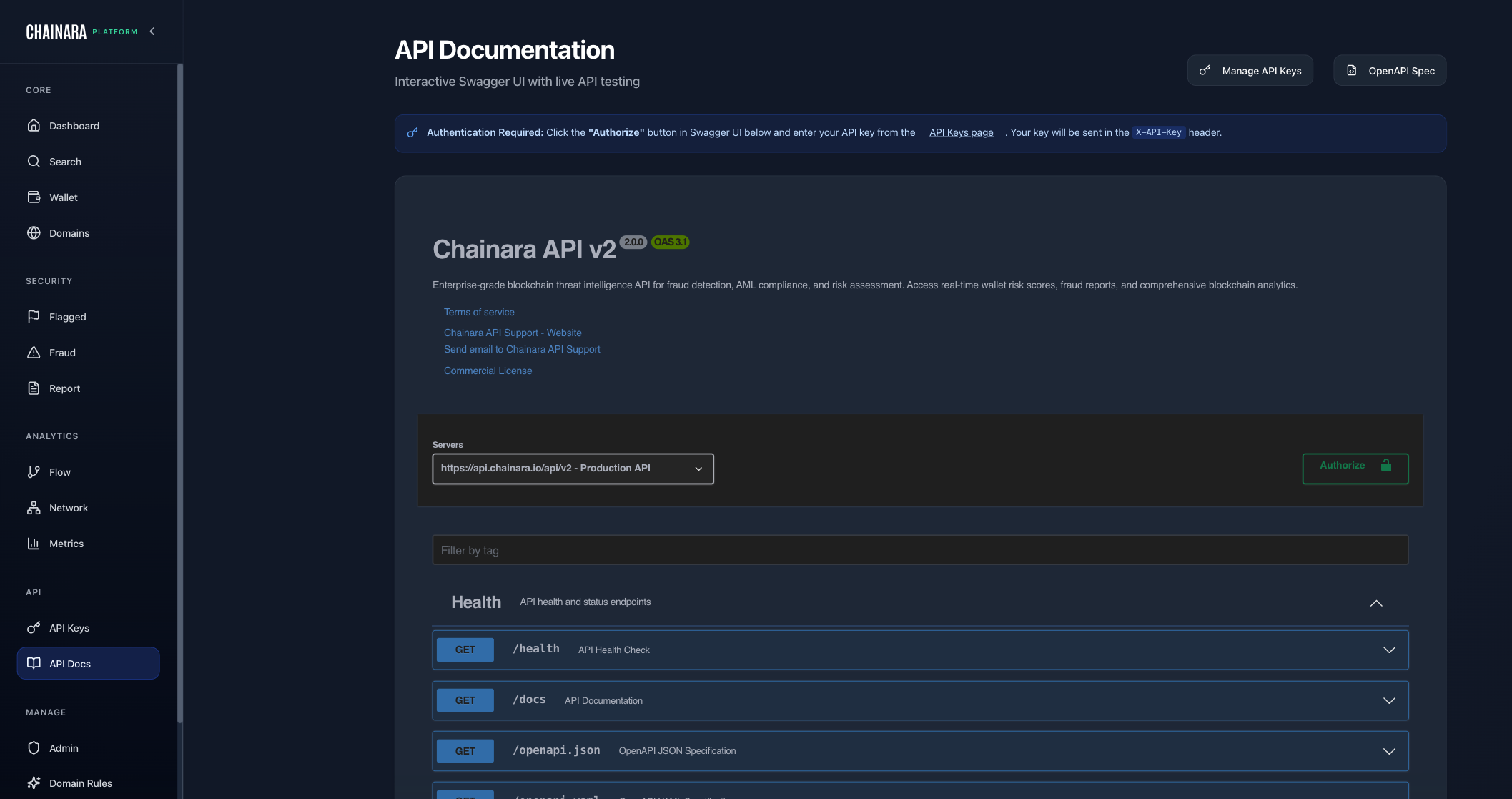
Snapshot
# Full threat intelligence snapshot (Enterprise)
curl "https://{tenant}-platform.chainara.io/api/v2/feed/snapshot" \
  -H "X-API-Key: ek_YOUR_API_KEY"

# Filter to blacklisted wallets on XRPL only
curl "https://{tenant}-platform.chainara.io/api/v2/feed/snapshot?type=wallet&blockchain=xrpl&severity_tier=blacklisted" \
  -H "X-API-Key: ek_YOUR_API_KEY"
Query parameters:
| Parameter | Values | Description |
|---|---|---|
type | domain, wallet, fraud_report, community_report | Filter by indicator type |
severity_tier | blacklisted, suspicious | Wallet severity tier |
min_confidence | 0.0–1.0 | Minimum confidence threshold |
blockchain | xrpl, stellar, bitcoin, ethereum | Filter by chain |
since | ISO 8601 timestamp | Only return items updated after this time |
cursor | string | Pagination cursor for large result sets |
Use since with a stored timestamp to build an incremental sync: only pull changes since your last fetch.
Webhooks (Real-Time Push)
Webhooks deliver threat events to your endpoint the moment they happen, eliminating the need to poll.
Register a Webhook
curl -X POST "https://{tenant}-platform.chainara.io/api/v2/webhooks" \
  -H "X-API-Key: ek_YOUR_API_KEY" \
  -H "Content-Type: application/json" \
  -d '{
    "url": "https://your-siem.example.com/chainara-events",
    "event_types": ["indicator_added", "indicator_updated", "indicator_removed"],
    "indicator_types": ["wallet", "domain"],
    "description": "SIEM integration"
  }'
The response includes a secret: store it securely for signature verification.
Verify Webhook Signatures
Every delivery includes an X-Chainara-Signature header. Verify it before processing:
import hmac, hashlib

def verify_signature(payload_bytes: bytes, signature: str, secret: str) -> bool:
    expected = hmac.new(
        secret.encode(),
        payload_bytes,
        hashlib.sha256
    ).hexdigest()
    return hmac.compare_digest(f"sha256={expected}", signature)
Webhook Payload Format
{
  "event": "indicator_added",
  "type": "wallet",
  "timestamp": "2024-03-15T10:22:00Z",
  "data": {
    "address": "rWALLET_ADDRESS",
    "blockchain": "xrpl",
    "risk_score": 82,
    "severity_tier": "blacklisted",
    "confidence": 0.85,
    "classification": "Fake Giveaway"
  }
}
Event types: indicator_added, indicator_updated, indicator_removed
Delivery Retry Policy
Chainara retries failed deliveries automatically. If your endpoint returns a non-2xx response or times out:
- Retries occur with exponential backoff
- Failed deliveries are visible in the delivery log (
GET /webhooks/{id}/deliveries) - Each log entry shows the HTTP status your endpoint returned, the response body, and the delivery timestamp
If your endpoint is down for an extended period, use the Threat Feed snapshot (GET /feed/snapshot?since=...) to catch up on missed events once it's back online.
Testing and Monitoring
# Send a test delivery to confirm your endpoint is receiving
curl -X POST "https://{tenant}-platform.chainara.io/api/v2/webhooks/{id}/test" \
  -H "X-API-Key: ek_YOUR_API_KEY"

# View delivery history and failure logs
curl "https://{tenant}-platform.chainara.io/api/v2/webhooks/{id}/deliveries" \
  -H "X-API-Key: ek_YOUR_API_KEY"

# Rotate signing secret without losing the subscription
curl -X POST "https://{tenant}-platform.chainara.io/api/v2/webhooks/{id}/rotate-secret" \
  -H "X-API-Key: ek_YOUR_API_KEY"
Error Responses
All errors follow a consistent JSON format:
{
  "error": "Description of what went wrong",
  "meta": {
    "timestamp": "2024-03-15T10:00:00Z",
    "version": "v2",
    "endpoint": "/api/v2/wallets/1/rADDR..."
  }
}
| Status | Meaning | Common Cause |
|---|---|---|
400 | Bad Request | Invalid address format, missing required field |
401 | Unauthorized | Missing or invalid X-API-Key |
403 | Forbidden | Your plan doesn't include this endpoint |
404 | Not Found | Wallet or resource doesn't exist yet |
429 | Too Many Requests | Rate limit exceeded: check Retry-After header |
500 | Internal Server Error | Backend error: retry with exponential backoff |
SIEM Integration Pattern
For real-time integration with a SIEM or exchange screening system, use webhooks for new threats and snapshot polling for initial bulk load and catch-up:
Initial setup:
  GET /feed/snapshot → load full current threat database into SIEM

Ongoing (choose one):
  Option A: Webhooks (recommended):
    POST /webhooks → subscribe to indicator_added + indicator_updated
    → Chainara pushes events to your endpoint in real time

  Option B: Polling (fallback):
    Every 5–15 minutes:
    GET /feed/snapshot?since={last_timestamp} → pull incremental changes
    Update your SIEM with new/changed indicators
For exchange wallet screening at transaction time, use the wallet endpoint directly:
# Screen a wallet before processing a withdrawal
curl -H "X-API-Key: ek_YOUR_API_KEY" \
  "https://{tenant}-platform.chainara.io/api/v2/wallets/1/{customer_wallet_address}/risk-score"

# Block if risk_score >= 75 or is_blacklisted == true
API Documentation (Swagger)
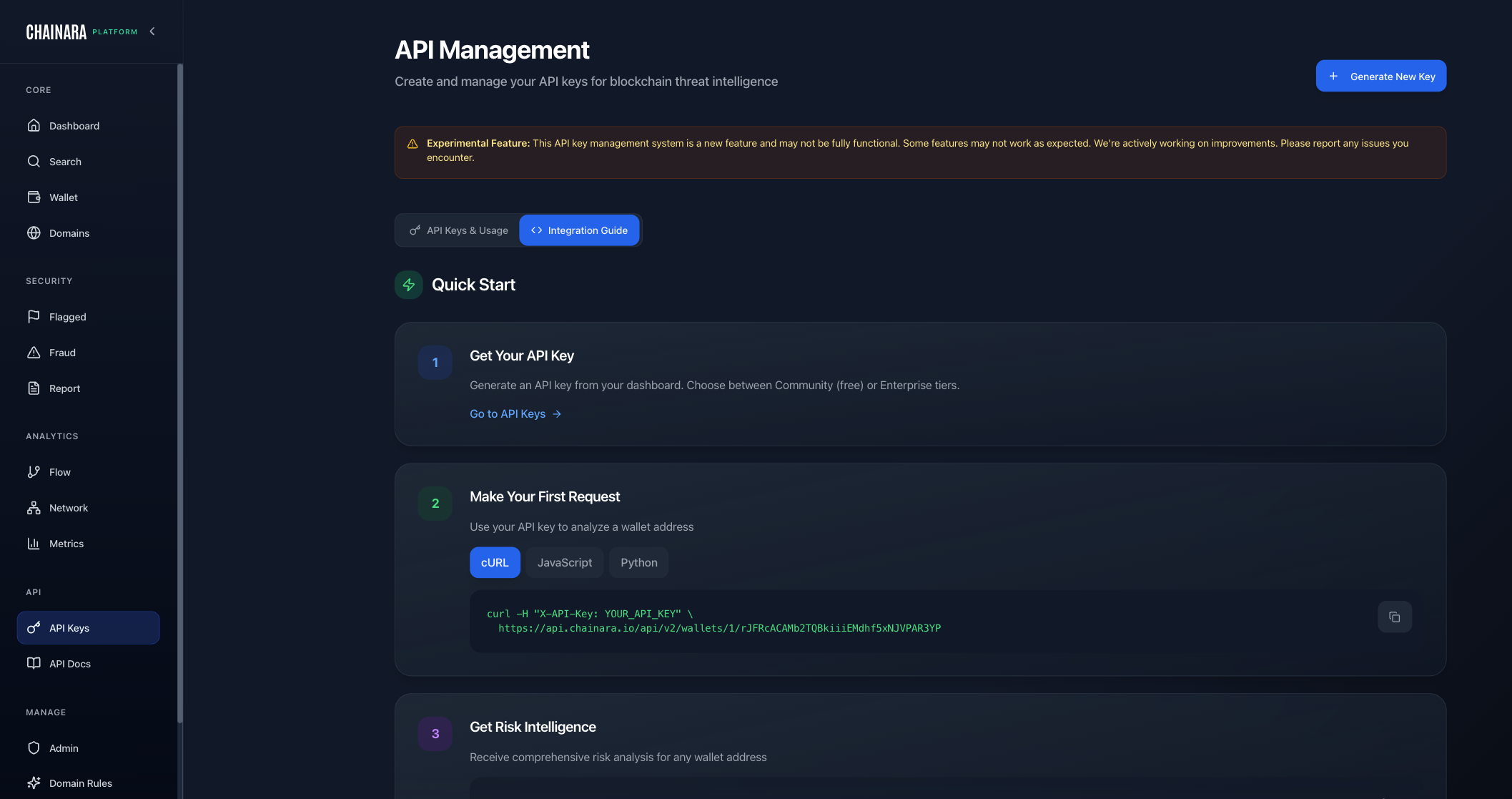
The full Swagger UI is available in the Platform at API Docs in the sidebar. It provides:
- Live endpoint testing with your API key
- Full request/response schemas for every endpoint
- Downloadable OpenAPI spec (
GET /openapi.json)
The Swagger UI also has an Internal API section (under Manage → Internal API) documenting internal endpoints used by the Platform frontend.