Domains
The Domains section lists all domains that Chainara Platform is actively monitoring for fraud, phishing, and brand abuse targeting XRP/Ripple users.
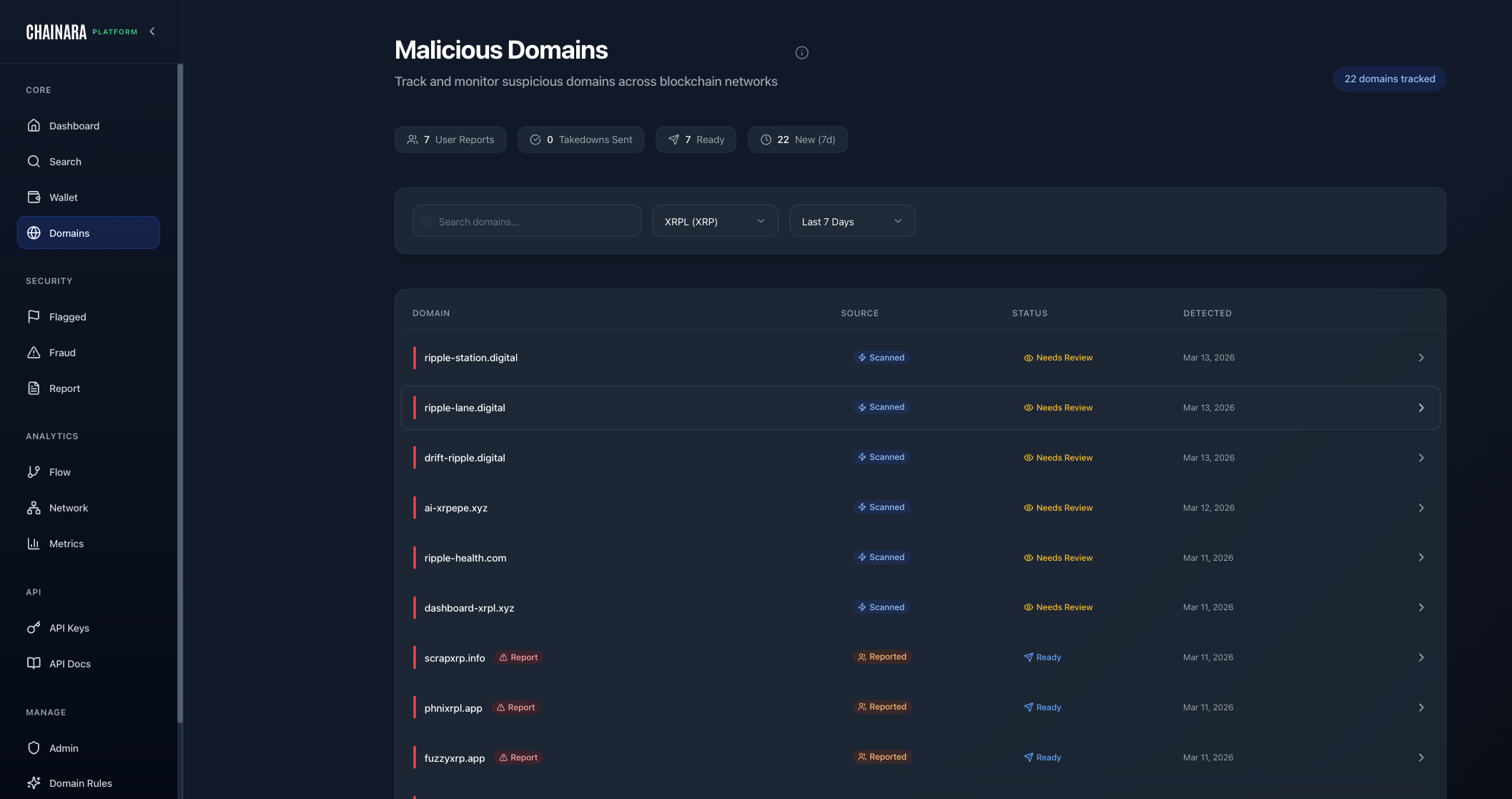
Domain List
The domain table shows:
| Column | Description |
|---|---|
| Domain | The monitored domain name |
| Risk Level | CRITICAL / HIGH / MEDIUM / LOW |
| Status | Ready / Flagged / Investigating / Whitelisted |
| Detection Rules | Which rules triggered on this domain |
| First Seen | When the domain was first detected |
| Last Checked | Most recent monitoring scan |
Domain Detail View
Click any domain to open its detail page:
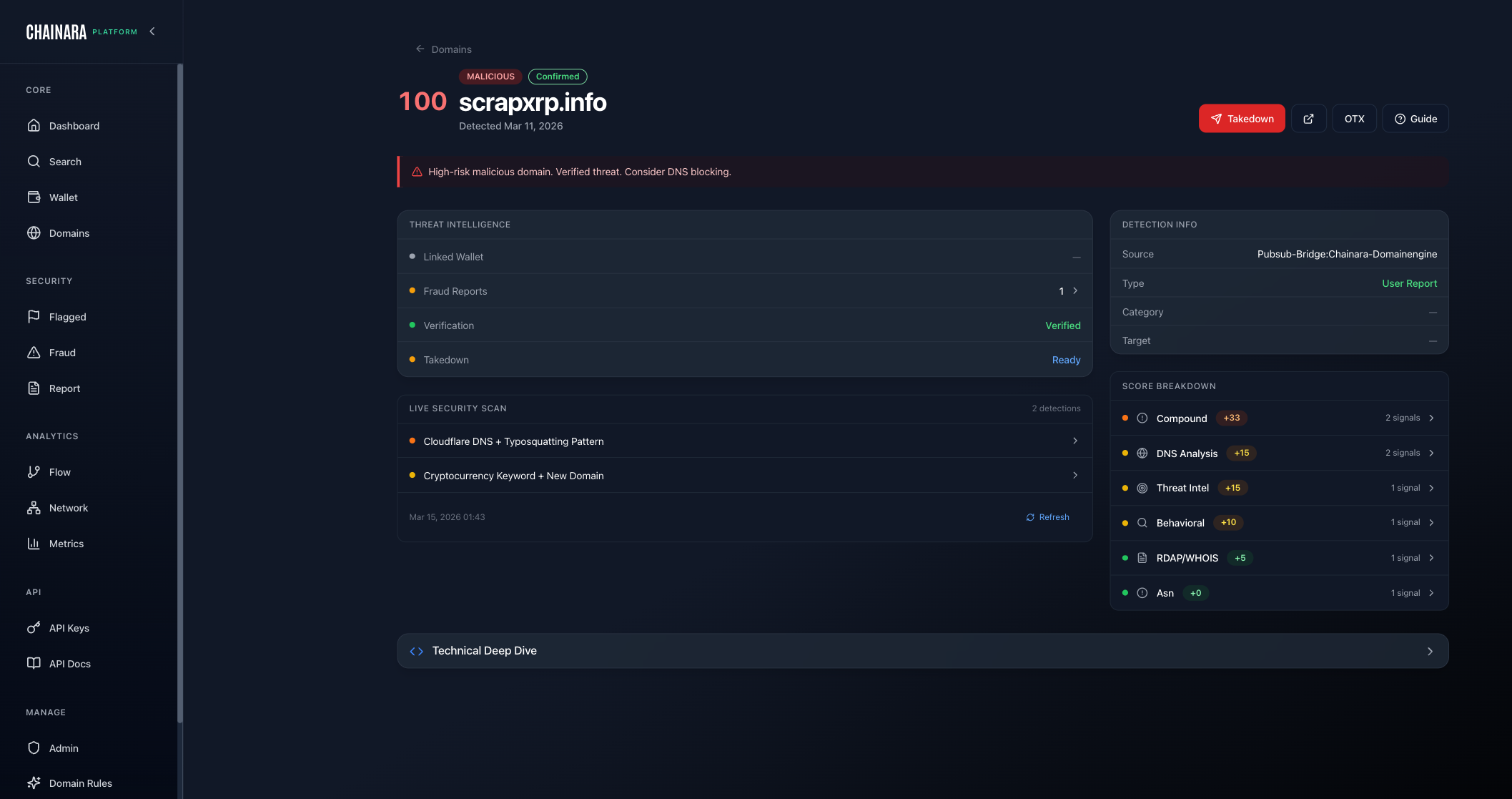
The detail view shows:
- WHOIS data: registrar, registration date, expiry
- DNS records: A, MX, NS records
- IP address and hosting provider
- Associated wallets: XRP addresses linked to this domain
- Screenshots: captured screenshots of the site
- Rule matches: which detection rules triggered
- Fraud reports referencing this domain
Adding a Domain for Monitoring
Admins can add domains to monitor from Admin → Domains:
- Click Add Domain
- Enter the domain name
- Select risk classification
- Assign applicable detection rules
- Click Save
To submit domains programmatically or queue them for immediate Intel scanning via the API, use the Domains API endpoints:
| Endpoint | Purpose |
|---|---|
POST /domains/report | Record a malicious domain in the threat database and dispatch it to the Intel scanner |
POST /domains/monitor | Queue a domain for Intel scanning without writing to the database (tip lists, IOC feeds) |
POST /domains/scan | Enterprise: submit a domain directly to the Intel scanner, bypassing the normal risk-score gate. Use when your team already suspects a domain is malicious and wants it investigated immediately without waiting for evidence to accumulate. |
GET /domains/lookup | Check a domain's current threat record or poll for scanner results |
POST /domains/scan is available on the Enterprise tier. Submissions are upserted with source_tier=tenant_submitted and a baseline risk score that the scanner can raise (never downgrade). Resubmissions are idempotent and increment a scan counter.
What happens after a domain is flagged
Verified malicious domains are automatically pushed to a tiered set of takedown and intelligence-sharing services so a single detection results in the broadest possible blocklist coverage, with no manual analyst work required:
| Service | What it does | Triggers at risk score |
|---|---|---|
| AlienVault OTX | Publishes a private TLP:AMBER pulse for community defenders | ≥ 70 |
| VirusTotal | Submits the domain for community scanning and aggregated detection | ≥ 70 |
| Netcraft | Anti-phishing service with broad ISP/browser blocklist coverage | ≥ 75 |
| URLhaus (abuse.ch) | Open malware/phishing URL blocklist (also feeds Spamhaus DBL) | ≥ 75 |
| Microsoft SmartScreen | Edge / Windows Defender SmartScreen blocklist | ≥ 85 |
| Google Web Risk | Chrome / Android Safe Browsing-equivalent enterprise feed | ≥ 65 (default) |
Each submission's status is tracked in the domain detail view, and customers subscribed to the takedown_submitted webhook event receive a notification each time a service is invoked. Most services blocklist within 24–48 hours; SmartScreen and Web Risk are typically faster.
Domain Detection Rules
Domains are automatically classified by an 8-stage detection pipeline combining rule matching, enrichment, and LLM analysis. See How Domain Detection Works for the full technical breakdown, Domain Detection Rules to configure your ruleset, and Risk Scoring to understand how the final score is calculated.
Most monitored domains are auto-discovered by the detection engine through typosquatting and phishing pattern matching: no manual submission required.