Domain Detection Rules
Chainara Platform uses an automated rule engine to detect malicious domains targeting XRP/Ripple users. Rules are fully configurable by admins.
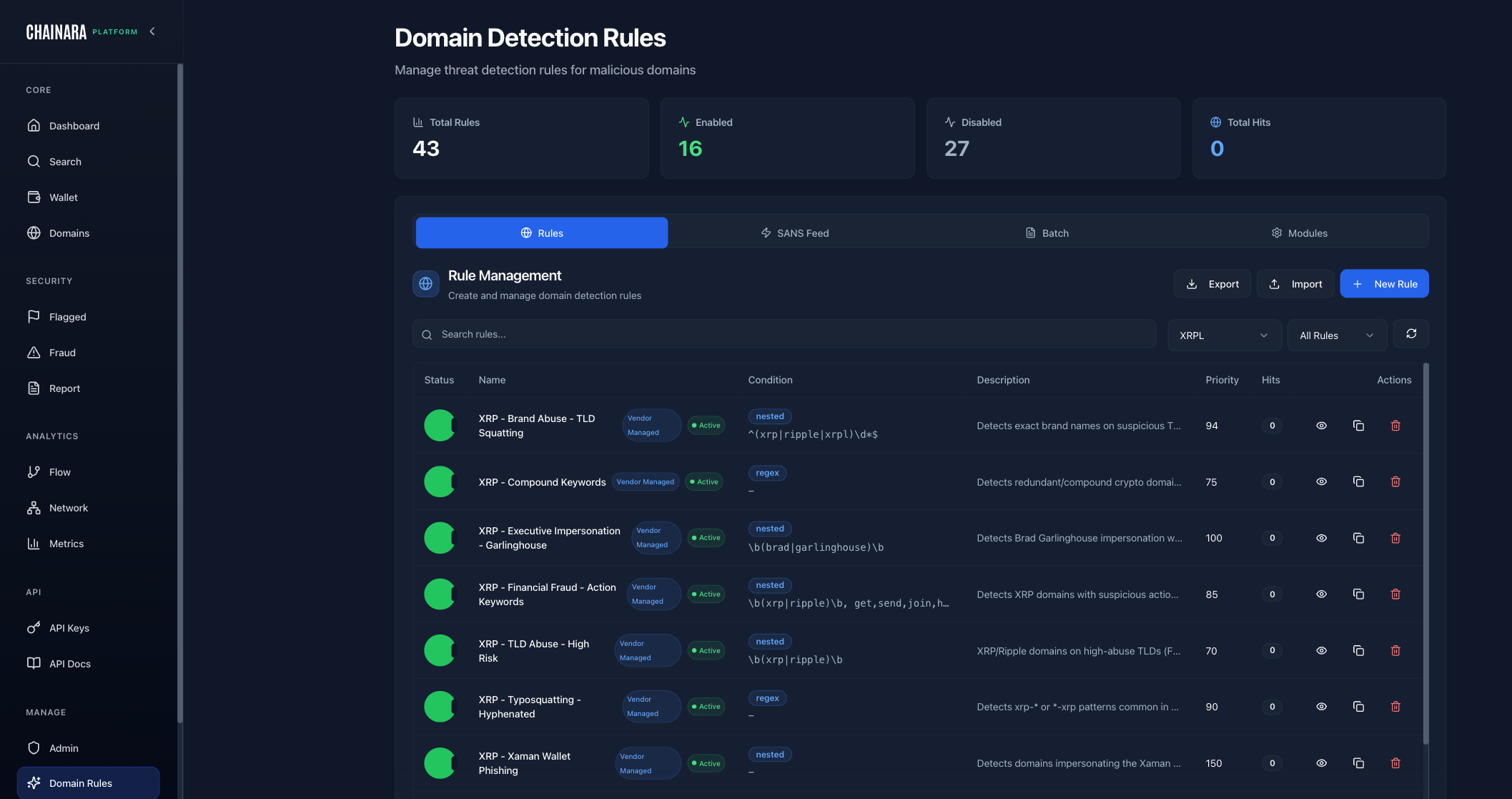
Overview
The Domain Rules page shows:
- 43 total rules in the system
- 16 enabled (actively scanning)
- 27 disabled (available but inactive)
XRPL-Specific Rules
These rules are specifically designed to catch domains targeting the XRP Ledger ecosystem:
| Rule Name | What It Detects |
|---|---|
| Brand Abuse TLD Squatting | Domains using Ripple/XRP brand names with unusual TLDs (e.g. ripple.xyz) |
| Compound Keywords | Domains combining XRP keywords in suspicious ways (e.g. xrp-claim-now.com) |
| Executive Impersonation Garlinghouse | Domains impersonating Brad Garlinghouse (Ripple CEO) |
| Financial Fraud Action Keywords | High-risk keywords: airdrop, giveaway, claim, double, multiply |
| TLD Abuse High Risk | Use of risky TLDs: .xyz, .top, .live, .click, .online |
| Typosquatting Hyphenated | Hyphenated versions of legitimate domains (e.g. ripple-official.com) |
| Xaman Wallet Phishing | Domains impersonating the Xaman (XUMM) XRP wallet app |
Rule Condition Types
Rules are built from 15 condition types that can be combined to create precise detection logic:
| Condition | Description | Example |
|---|---|---|
domain_contains | Substring match on the domain name | giveaway, airdrop, doubling |
domain_regex | Full regex match against the domain | xrp[-_]?(claim|free|gift) |
domain_length | Domain character count above/below threshold | Length > 30 chars |
tld_match | Top-level domain is in a list | .xyz, .top, .live, .click |
typosquat_match | Levenshtein similarity to a protected brand | Similar to ripple.com, xrpl.org |
certificate_age | SSL cert issued within N days | Cert age < 7 days |
dns_missing | Required DNS record type is absent | No MX record, no SPF record |
ip_range | Resolved IP is within a CIDR block | Known bulletproof hosting range |
asn_match | Hosting ASN matches a known malicious network | ASN associated with abuse |
country_match | Hosting country is in a high-risk set | Country code in deny list |
registrar_match | Registered via a high-abuse registrar | Known low-cost abuse registrars |
nameserver_match | Nameserver provider known for hosting abuse | Bulletproof NS providers |
ssl_issuer | SSL certificate issued by a specific CA | Let's Encrypt, ZeroSSL (free CAs) |
creation_date | Domain registered within N days of check | Registration < 30 days ago |
blockchain_keyword | Contains XRP/crypto brand terms | ripple, xrp, xumm, xaman |
Rule Configuration
Each rule has:
| Setting | Description |
|---|---|
| Name | Descriptive rule name |
| Condition Type | One of the 15 condition types above |
| Pattern / Value | Regex, keyword list, CIDR, or threshold depending on condition type |
| Risk Score Contribution | How much this rule adds to the domain's risk score (0–100) |
| Enabled/Disabled | Whether the rule is active |
| Auto-flag | Whether a match immediately flags the domain without waiting for full pipeline |
Risk score contributions
Each rule's Risk Score Contribution (0–100) is added directly to the domain's composite risk score. Scores are capped at 100: a domain triggering three rules totaling 150 points still scores a maximum of 100.
If multiple rules match the same domain, their contributions are summed before capping. Rules with Auto-flag enabled bypass the scoring cap and immediately classify the domain as critical regardless of composite score.
There is no rule conflict detection: rules are independent and their contributions are always additive. If two rules overlap in intent (e.g. both match giveaway keywords), both will fire and both will contribute to the score.
Managing Rules
Enabling/Disabling a Rule
- Go to Admin → scroll to Domain Rules (or navigate directly via sidebar)
- Find the rule in the list
- Toggle the Enabled switch
- Changes take effect on the next domain scan
Adding a Custom Rule
- Click Add Rule
- Enter a name, pattern (regex), and risk contribution
- Choose whether to auto-flag matches
- Click Save
Testing a Rule
Use the Test button next to any rule to run it against a specific domain and see if it matches before enabling it.
Start with the XRPL-specific rules enabled. They are pre-tuned for the Ripple/XRP ecosystem and catch the most common fraud patterns targeting this community.