Flow Analytics
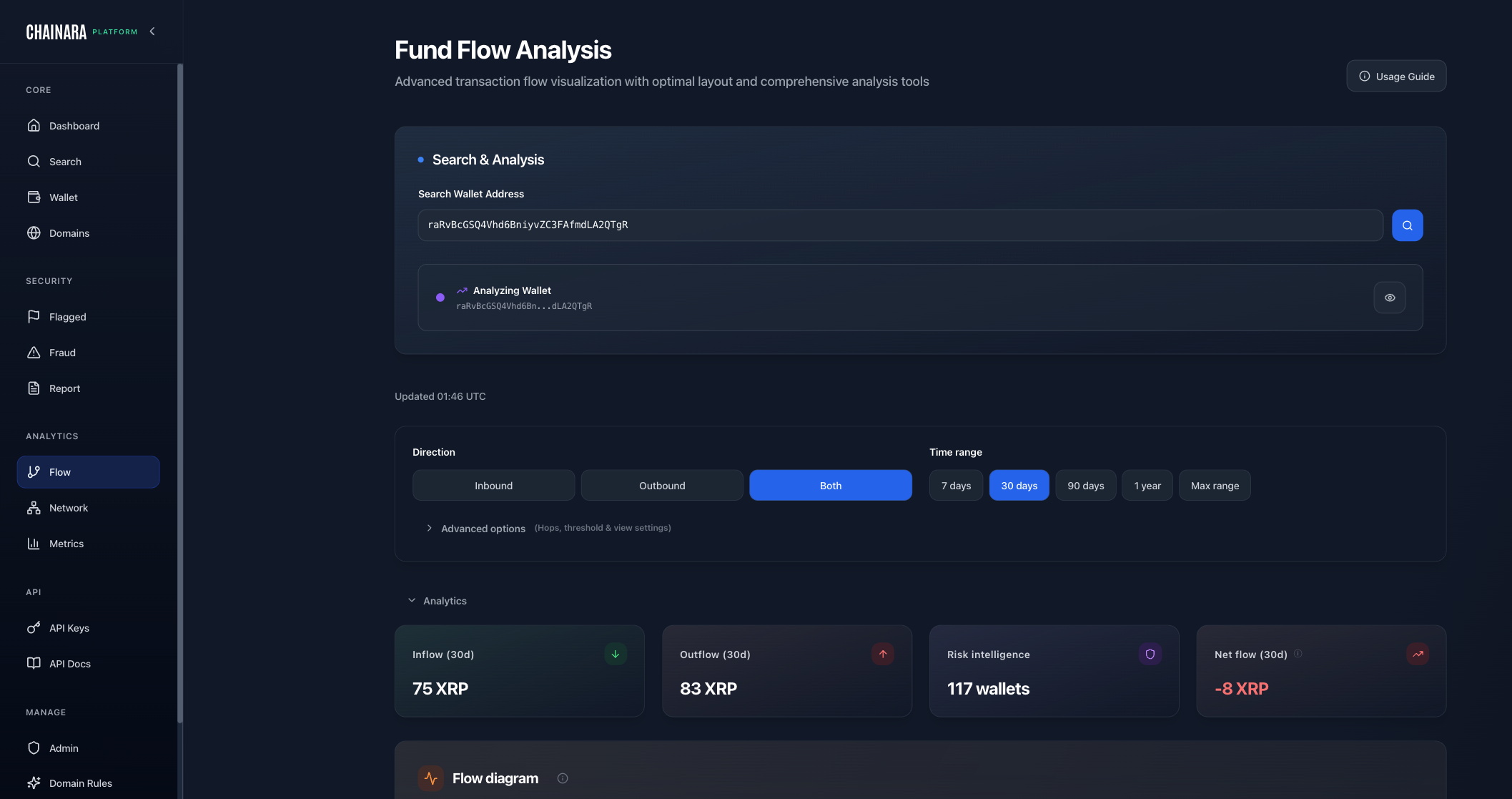
Flow Analytics is Chainara's interactive Sankey-style fund-flow tracer. Given a starting wallet or transaction, it walks the on-chain transaction graph and renders a visual map of where money came from and where it went, across multiple hops and across multiple blockchains.
Supported blockchains
Fund-flow tracing is available on every blockchain Chainara supports, not just XRPL:
- XRPL: full coverage including memo and destination-tag tracking
- RLUSD: XRPL-issued stablecoin, traced as XRPL transactions
- Stellar: BFS traversal with safety limits
- Bitcoin: UTXO-aware traversal
- Ethereum and EVM chains: Ethereum, BSC, Polygon, Arbitrum, Avalanche, Flare
- SUI: transactions normalized into Sankey-compatible format
Use the chain selector at the top of the page to switch contexts. Some chains are marked Experimental: the underlying data is live, but the interactive view may show a beta warning before opening.
What Flow Analytics shows
Given a starting wallet or transaction, Flow Analytics builds a visual timeline showing:
- Inbound flows: funds arriving at the wallet, and from where
- Outbound flows: funds leaving the wallet, and to where
- Layering patterns: rapid pass-through of funds, common in money laundering
- Aggregation: multiple sources funneling into one destination
- Cash-out paths: outflows landing at known exchanges, mixers, or off-ramps
How to use
- Navigate to Flow Analytics in the sidebar
- Select the blockchain (XRPL is default)
- Enter a wallet address or transaction hash
- Set the hop depth (how many wallets deep to trace) and date range
- Click Analyze
The system traces the chain and renders the fund-flow visualization. Results are cached so re-opening the same wallet within ~30 minutes loads instantly; click Refresh at any time to bypass the cache and re-crawl with current on-chain state.
Reading the flow chart
- Each node represents a wallet
- Arrows show the direction of fund transfer
- Arrow thickness indicates the relative volume
- Color coding:
- 🔴 Red = flagged / high-risk wallet
- 🟠 Orange = medium risk
- ⚫ Gray = unknown / unscored
- 🟢 Green = whitelisted / known benign (exchanges, custodians)
Hover any node for the full wallet card. Cmd/Ctrl + click any node, flow row, or Open button to open the target wallet in a new tab. This is useful for branching investigations without losing your place.
Crawl limits
Each trace runs under per-request safety limits so a single investigation can't exhaust shared resources. The crawl-stats panel shows the actual transaction date range covered, so you can see at a glance whether the trace hit a limit. If a wallet's history is too dense for the default crawl, switch on Max Range to fetch deeper history (up to 10,000 root transactions) and try again.
Filtering the graph
Once a graph is rendered you can prune it without re-crawling:
| Filter | Use case |
|---|---|
| Amount threshold | Hide dust transactions to focus on meaningful flows |
| Direction | Show only inbound, only outbound, or both |
| Hop depth | Limit visible hops without losing the underlying data |
| Destination tag aggregation | Collapse all transactions sharing a destination tag (XRPL/Stellar) into a single edge (e.g. all deposits to one exchange account) |
Right-click any node for a context menu: pivot to that wallet's analysis, copy the address, or open in a new tab.
Common patterns
| Pattern | What it means |
|---|---|
| Star burst | One wallet receiving from many small wallets (aggregation, often pre-cash-out) |
| Chain | Linear A → B → C → D with no looping (classic layering) |
| High hop count + rapid timing | 5+ hops within minutes (strong money-laundering signal) |
| Fan out | One wallet distributing to many (cashing out across exchange accounts) |
| Tight cluster | Many wallets with high mutual connectivity (a coordinated scam operation) |
Exporting flows
Click Export CSV to download the currently-visible graph as a flat list of edges. Export respects every active filter (amount, direction, hop depth) so you only get the rows you can see. Each row contains:
- Source wallet, target wallet
- Hop number from the seed wallet
- Entity name (if the wallet is labelled as an exchange, custodian, or mixer)
- Direction (inbound / outbound)
- Amount and transaction count
- Last transaction date
- Transaction hashes (for evidence trails)
CSV exports are designed to drop straight into a SAR or LE evidence package without further wrangling.